
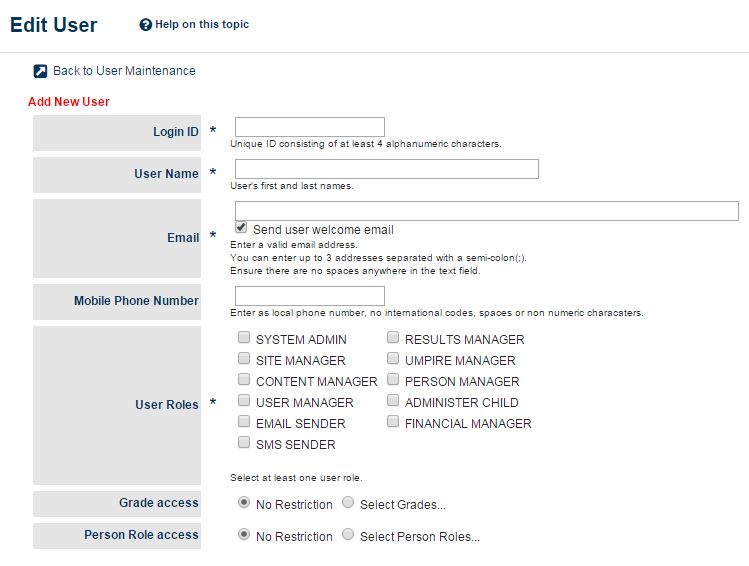
Below are recommendations of what user roles should be setup in MyCricket users for people within your club/association.
Users can be created and edited through;
Administration (MODE) > Users > User List.
Please ensure your User List is kept up-to-date with people who are active within your club/association.
Cricket Blast: Junior/Master Blasters - Coordinator
Required User Role – Person Manager or Site Manager
Person Manager (only)
- Provides access to Centre Management pages as well as other person management screens such as Team Selection and the Person List. Bank Account Details page also accessible.
- Person Role Restrictions: No Restrictions
- Grade Restrictions: No Restrictions
Site Manager (only)
- This restricts the user to the Cricket Blast Centre Management (also allows access to Bank Account Details page).
- Person Role Restrictions: No Restrictions
- Grade Restrictions: No Restrictions
Scorer using the MyCricket Live Score app
Required User Roles – Person Manager and Results Manager
Person Manager
- To be able to organise players in order to manage team selections/manual registrations.
Results Manager
- Grade access optional
- Result/Scores entry
Team Captain
Person Manager
- Person role access optional
Results Manager
- If responsible for entering match reports, results or scores. Grade access optional.
Junior Coach
Person Manager
- Personal Role access: PLAYER: JUNIOR
Results Manager
- Grade Access: Junior Grades
Email Sender
SMS Sender
Senior Coach
Person Manager
- Personal Role access: PLAYER: SENIOR
Results Manager
- Grade Access: Senior Grades
Email Sender
SMS Sender
Secretary
System Admin
- This provides full access for the club/association within MyCricket. Should only be given to high level committee members.
President
System Admin
- This provides full access for the club/association within MyCricket. Should only be given to high level committee members.
Treasurer
Financial Manager
- Gives the treasurer the ability to add and change club bank details.
Website Manager
Content Manager
- Gives access to the 'Content' tab and its subheadings on the organisation's MyCricket website.
Site Manager
- Gives access to the 'Site' tab and its subheadings on the organisation's MyCricket website.
Association Administrator
System Admin
- This provides full access for the club/association within MyCricket. Should only be given to high level committee members.
Administer Child
- Allows the Association to administer child organisations (affiliated clubs) within MyCricket.
Comments
0 comments
Article is closed for comments.